AI Automation for Service Businesses: Where Practical Helpers Actually Fit
AI automation for service businesses is not a replacement for the owner or office team. It is a small set of supervised helpers for the handoffs the team repeats every week.
The first useful question is not "which AI tool should we buy?" It is "which repeated handoff in our operation is going to memory right now?"
Short answer
AI automation for service businesses is the supervised use of practical AI helpers for the small, repeated handoffs a team already does every week: capturing missed calls and forms, routing new inquiries, sending routine follow-up, summarizing jobs, flagging stale estimates, preparing invoice handoffs, and giving the owner a clean view of what is stuck. It is monitored operations automation, not a replacement for judgment. Pricing, scheduling, scope changes, complaints, refunds, and approvals still belong to people.
If the first handoff is not obvious, start with the Ops Scorecard. If it is obvious, the next move is one supervised AI helper team built around that single workflow.
What "AI automation for service businesses" actually means
The phrase gets used loosely. For a roof, HVAC, plumbing, electrical, remodeling, cleaning, or field-service company, the practical definition has four parts:
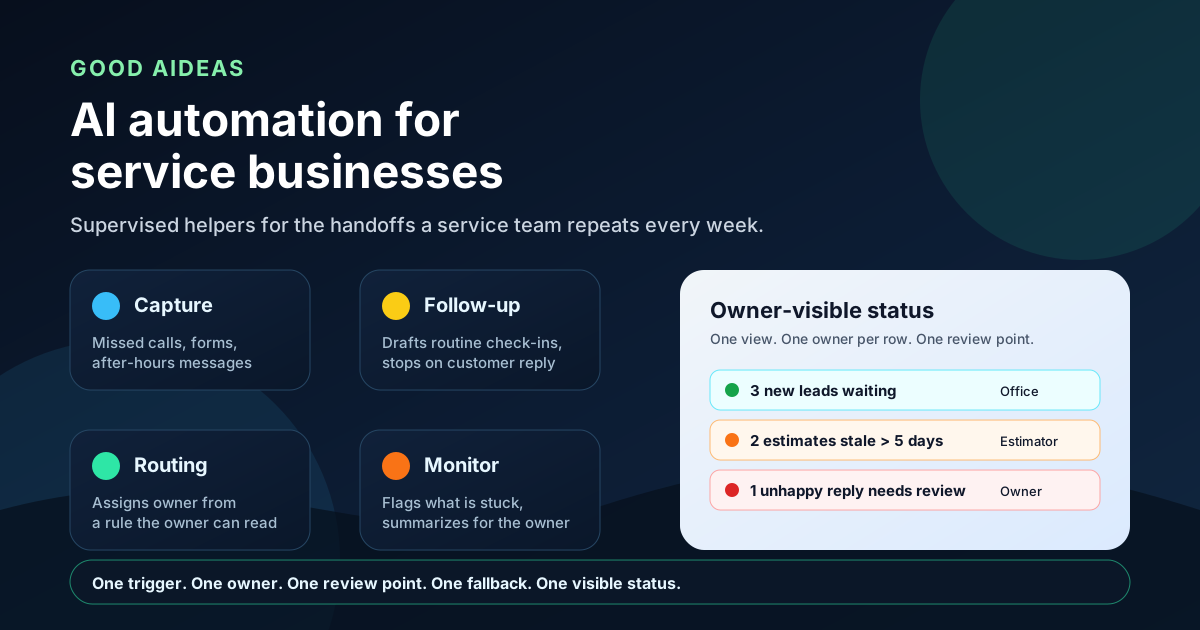
- Capture: every new lead, form, message, missed call, and after-hours inquiry lands in one visible place with a timestamp and an owner.
- Route: the right person or queue is notified based on a rule the owner can read on one page.
- Follow-up: routine reminders, acknowledgements, and check-ins go out on a sensible rhythm and stop the moment the customer replies.
- Monitor: an owner-visible status board shows which jobs, leads, estimates, invoices, and replies are stuck right now and who owns the next step.
That is the operating picture. The "AI" part is the supervised layer that prepares, drafts, summarizes, classifies, and flags. It is not the layer that decides price, commits a date, or speaks for the business on a sensitive topic.
This framing matters because most service businesses that tried AI in the last two years got stuck in one of two places: either the AI was a generic chat widget that did not connect to anything, or it was sold as a full replacement for an office role. Neither pattern is monitored operations automation.
Where AI helpers fit in a service operation
A useful way to think about it is to start with the handoff, not the tool. Below is a small, common-sense map of where supervised AI helpers actually do useful work in a service business today.
| Handoff | What an AI helper can do | What should stay with a person |
|---|---|---|
| New lead capture | Log missed calls, forms, messages, and after-hours inquiries into one queue with timestamps | Decide fit, urgency, and whether the lead is real |
| Lead routing | Suggest an owner based on service type, location, or capacity rules | Final routing and capacity tradeoffs |
| Estimate follow-up | Draft the next check-in, flag stale estimates, summarize the quote context | Discounts, scope changes, and "is this still a fit?" calls |
| Job closeout | Request missing photos, materials, and signatures; draft a closeout summary | Field judgment, warranty calls, and quality complaints |
| Invoice handoff | Route invoice-ready jobs, flag missing context, draft a polite reminder | Approvals, disputes, and write-off decisions |
| Customer replies | Classify replies, draft routine acknowledgements, flag unhappy tone | Complaints, refunds, and emotional conversations |
| Owner visibility | Produce a daily "what is stuck" digest from the existing tools | Setting priorities and the call that breaks a tie |
None of these helpers are glamorous. That is the point. The boring handoffs are where the work piles up and the customer experiences the business.
What AI automation should NOT replace yet
A few judgment calls still belong to the people who know the customer, the job, and the local context. The list below is not exhaustive, but it is the safest starting position for almost every service business.
- Final pricing, discount, and scope decisions.
- Schedule conflicts, capacity calls, and emergency rerouting.
- Complaints, refunds, warranty disputes, and sensitive replies.
- Approvals that move money, change scope, or commit the business publicly.
- Anything that involves a safety call, a regulatory step, or a local code interpretation.
Supervised AI helpers can prepare, draft, summarize, and flag. They should not own the decision in any of the above moments. Keeping that boundary explicit is the difference between a monitored operations automation rollout and a quiet liability.
A practical first AI helper for a service business
The safest first helper is the one attached to the dropped ball the owner already feels. A common starting point looks like this.
A residential HVAC company has two estimators, one office manager, and a service manager who also runs parts. The dropped ball they keep feeling is quote follow-up: estimates go out, customers go quiet, and nobody is sure which quote is still warm versus which one is cold.
The first AI helper does four things, no more:
- Watches for new estimates that have been sent and not replied to.
- Drafts a short, human-sounding check-in on a 2-day, 5-day, and 10-day rhythm.
- Stops the moment the customer replies and surfaces the reply to the office.
- Posts a daily summary of stale estimates to the owner channel with last-touch context.
The helper does not decide to send, decide to discount, or close the loop. The estimator and office manager decide. The helper makes sure nothing sits in the dark.
After that first helper runs for a few weeks, the same company usually adds a second helper for missed-call text-back, then a third for invoice-ready job review. Each new helper stays supervised, stays small, and stays visible.
How to choose the first AI helper for your business
The choice is rarely about which AI vendor is best. It is about which handoff is leaking most. A simple way to pick:
- If calls, forms, or messages sit too long, start with a Speed-To-Lead helper.
- If estimates go quiet after they are sent, start with an estimate follow-up helper.
- If invoices stall before they go out, start with an invoice handoff helper.
- If the team is unsure which customer replies need a human, start with a reply-classification helper.
- If the owner only learns about problems on Friday, start with a daily "what is stuck" digest.
- If more than one handoff looks roughly equal, start with a single narrow Quick Immediate Win instead of trying to pick the perfect one.
A 15-minute conversation with the Ops Scorecard usually surfaces the first one. If two handoffs tie, pick the one that costs the business the most customer pain, not the one that is most interesting technically.
Why monitored beats magic
"AI agent" is a tempting phrase. The more useful phrase for a service business is supervised helper, and the more useful product pattern is a small monitored AI helper team built around one handoff at a time.
A monitored setup has a few non-negotiable parts:
- A clear trigger the owner can name out loud.
- One named owner for the next step.
- One human review point in the workflow.
- One fallback path if the helper is unsure.
- One owner-visible way to see whether the handoff is actually happening.
If any of those parts is missing, the helper is not monitored yet. It is just a script. That distinction is what keeps the rollout safe and what lets the owner expand scope later without losing control.
What to do this week
Pick one handoff that is already annoying the team. Write down the trigger, the owner, the review point, and the fallback. Decide which part a supervised helper can do without changing the customer experience. Build that one helper first. Make it visible. Run it for a few weeks. Then decide whether the second helper is worth building.
A small, monitored first helper is more useful than a large, unmonitored one. It is also the only kind of AI automation that holds up when a real customer, a real complaint, and a real owner are all in the same week.
FAQ
What is AI automation for service businesses?
AI automation for service businesses is the supervised use of practical AI helpers for the small, repeated handoffs a team already does every week, such as capture, routing, follow-up, monitoring, and reporting. The helpers are monitored. Judgment calls stay with people.
What can AI helpers do for a service business today?
They can capture missed calls, forms, and after-hours inquiries, route new leads, draft routine follow-up, summarize jobs, flag stale estimates, prepare invoice handoffs, classify customer replies, and give the owner a daily view of what is stuck.
What should AI helpers NOT replace in a service business?
AI helpers should not replace pricing, scope, scheduling conflicts, complaints, refunds, warranty calls, approvals that move money, or any decision that requires local context or judgment. They can prepare and flag those moments, but a person should own them.
How do I choose the first AI helper for my service business?
Choose the handoff with the clearest dropped ball, such as slow new-lead response, quiet estimates, missing job notes, delayed invoices, or customer replies sitting without review. The Ops Scorecard helps identify that starting point, and the AI Agent Team Starter is the smallest way to build a supervised helper around it.
What is the difference between AI automation and a monitored operations automation rollout?
AI automation is the broader category. Monitored operations automation is the specific rollout pattern: a small supervised helper with a clear trigger, one named owner, one human review point, one fallback path, and one owner-visible way to see whether the handoff is happening. The monitored pattern is what makes the broader category useful for service businesses.
Is an AI agent team the same as replacing my office manager?
No. A supervised AI helper team supports capture, routing, follow-up, monitoring, and reporting. The office manager still owns pricing, scheduling, complaints, approvals, and the calls that need real context.
Next step
Find the leak, then pick the monitored fix.
Not sure which workflow is leaking attention first? Start with the Scorecard, or continue into the offer most related to this field note.
For websites where unclear offers, forms, and routing make monitored automation harder to trust.